/01
Know what’s on hand.
See quantities and low-stock flags by branch. Follow the recorded movements behind a change in stock.
INVENTORY & BRANCHESINVENTORY & OPERATIONS, IN ONE PLACE
Bring inventory, purchasing, and sales orders together across your stores and warehouses.
THE WORK KENDRI BRINGS TOGETHER
Know what you have, what you’ve ordered, and what needs to go out. Keep the records for each step in one place.
See quantities and low-stock flags by branch. Follow the recorded movements behind a change in stock.
INVENTORY & BRANCHESKeep purchase orders, partial deliveries, and supplier payments together. Know what arrived and what is still due.
PURCHASING & SUPPLIERSFollow sales orders through dispatch and keep customer payment records alongside the work.
SALES & PAYMENT TRACKINGA CLOSER LOOK AT KENDRI
Explore branch inventory and purchase receiving inside Kendri. Choose a view to inspect the actual application.
AN EXAMPLE FROM THE WORKSPACE
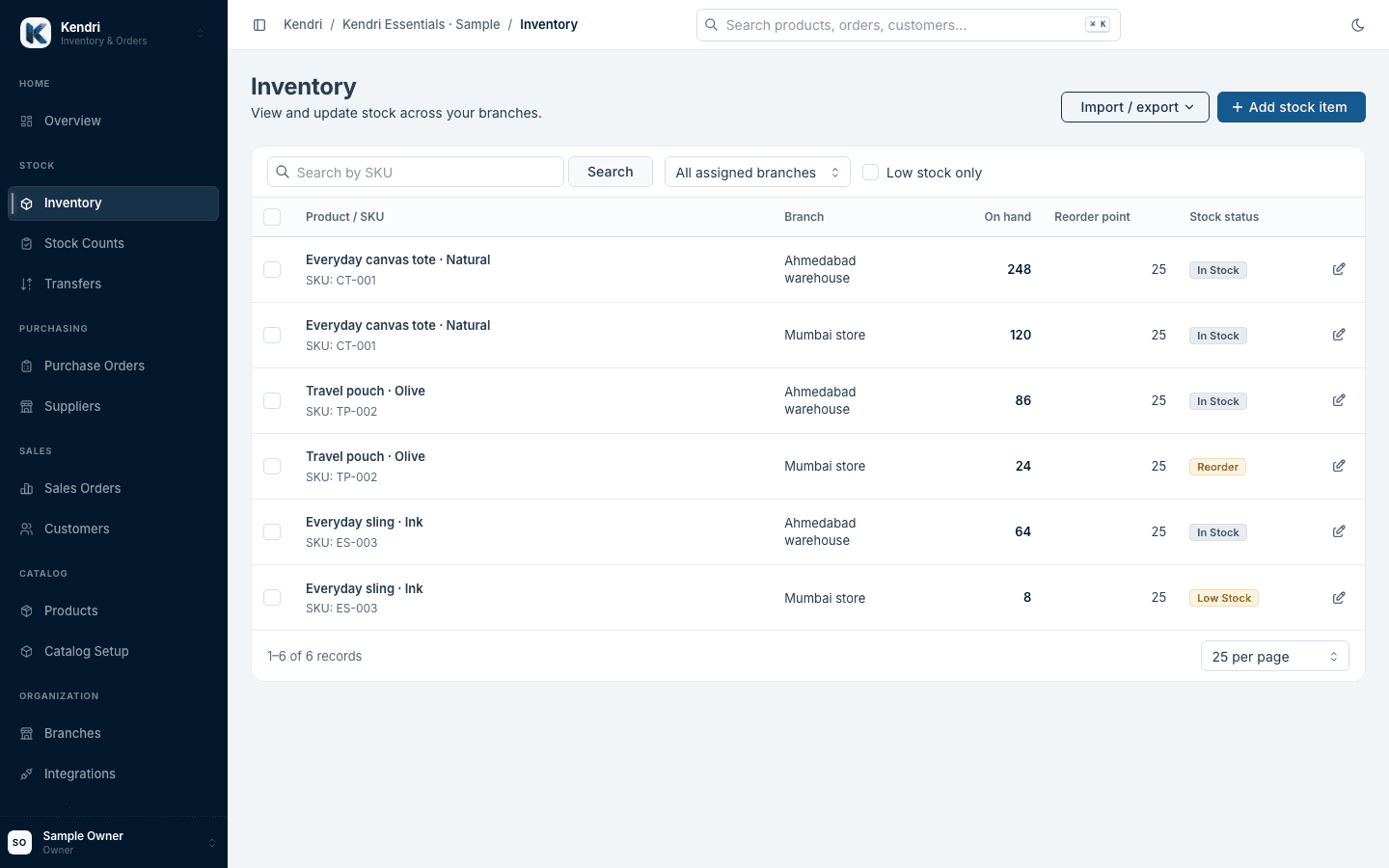
Compare the same product across two locations. See branch quantities, reorder points, and low-stock flags in the inventory workspace.
Actual application. Sample business data.
WHO KENDRI IS FOR
01 / GROWING BRANDS
Keep a growing catalog organised, with products, stock, and day-to-day orders in one place.
02 / WHOLESALERS
Follow supplier purchases, partial deliveries, and customer orders. Keep their payment records close to the work.
03 / MULTI-BRANCH BUSINESSES
Know which location holds the stock you need. Coordinate transfers between your stores and warehouses.
Set up the stores and warehouses where your stock lives.
Add products and SKUs, then enter quantities or import stock with CSV.
Invite employees. Assign their branches and the work they can view or change.
Owners manage the company. Administrators run operations. Employees work within their assigned branches and permissions.
COMMON QUESTIONS
Set up your products and branches, then add opening quantities or use inventory CSV import. Review SKUs and branch assignments before importing. For help planning a move from your current tools, email sales@kendri.in.
Employees can be assigned specific branches and permissions for supported work areas. Owners and administrators manage access. Company ownership and billing remain owner responsibilities.
Kendri focuses on commerce operations. Supplier payments and customer receipts provide operational context alongside orders. They do not replace your accounting software or your accountant’s books.
Marketplace connectivity is part of Kendri’s roadmap. Supported channels and their release status will be published as they become available. The product screens on this website show branch inventory and purchasing; they do not demonstrate live marketplace synchronization.
Email sales@kendri.in to discuss your operation and ask about current availability, pricing, and trial terms. Public pricing and a self-service trial offer have not yet been announced.